Website monitoring
Your websites, the way your customers see them.
A monitor is a question asked from outside, once a minute by default: does the page answer over HTTPS, with the right status code, and does it show the right text? Four probe locations ask, and an alert is only raised when they agree.
The essentials
Four locations
Nuremberg, Helsinki, Ashburn (USA) and Singapore. A round only counts as red when every location currently reporting sees the error.
Expiry in view
A warning 14 and 3 days before a certificate expires, and 30 and 7 days before a domain does.
More than websites
Heartbeats for cron jobs and backups, plus ping, TCP and DNS.
01
HTTPS, status code and text
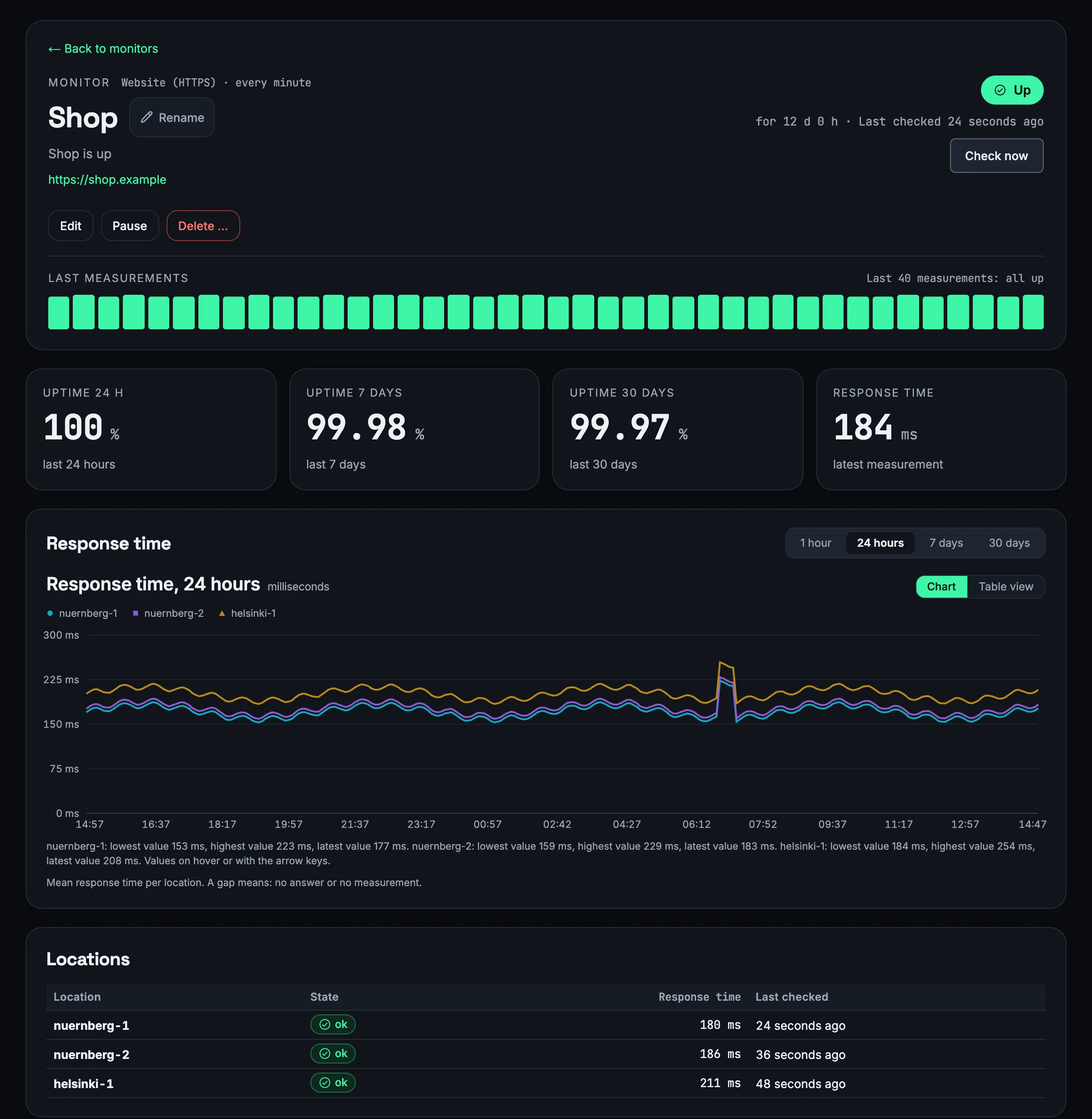
Lynx fetches the page like a browser and checks what comes back: the status code, the response time and the content.
You decide which status codes are fine – as a list or range, such as 200-299,301 –, which text must appear on the page and which must not, optionally ignoring upper and lower case. Above a response time you choose, the page counts as slow.
A monitor asks with GET, HEAD or POST, follows up to ten redirects if you want and waits up to 15 seconds. It can send custom headers and authenticate with Basic or Bearer; the credentials are stored encrypted. The interval ranges from ten seconds to one day.
Status code
lists and ranges, e.g. 200-299,301
Text
must appear on the page – or must not
Response time
measured per location, with its own limit for “slow”
Headers and authentication
custom headers, Basic or Bearer, stored encrypted
02
Four locations, one verdict
A single location can be wrong – a line stutters, a network hiccups. That is why Lynx only counts what all of them see.
A round is red when every location currently reporting sees the error. Only after two red rounds in a row does it become an incident – at a one-minute interval, after about two minutes. The monitor is back to normal after two green rounds.
If only some locations see the error, Lynx does not alert; on a public status page the service then shows as “degraded”. A monitor's page shows the response times of all locations as a chart and each location's latest result in a table.
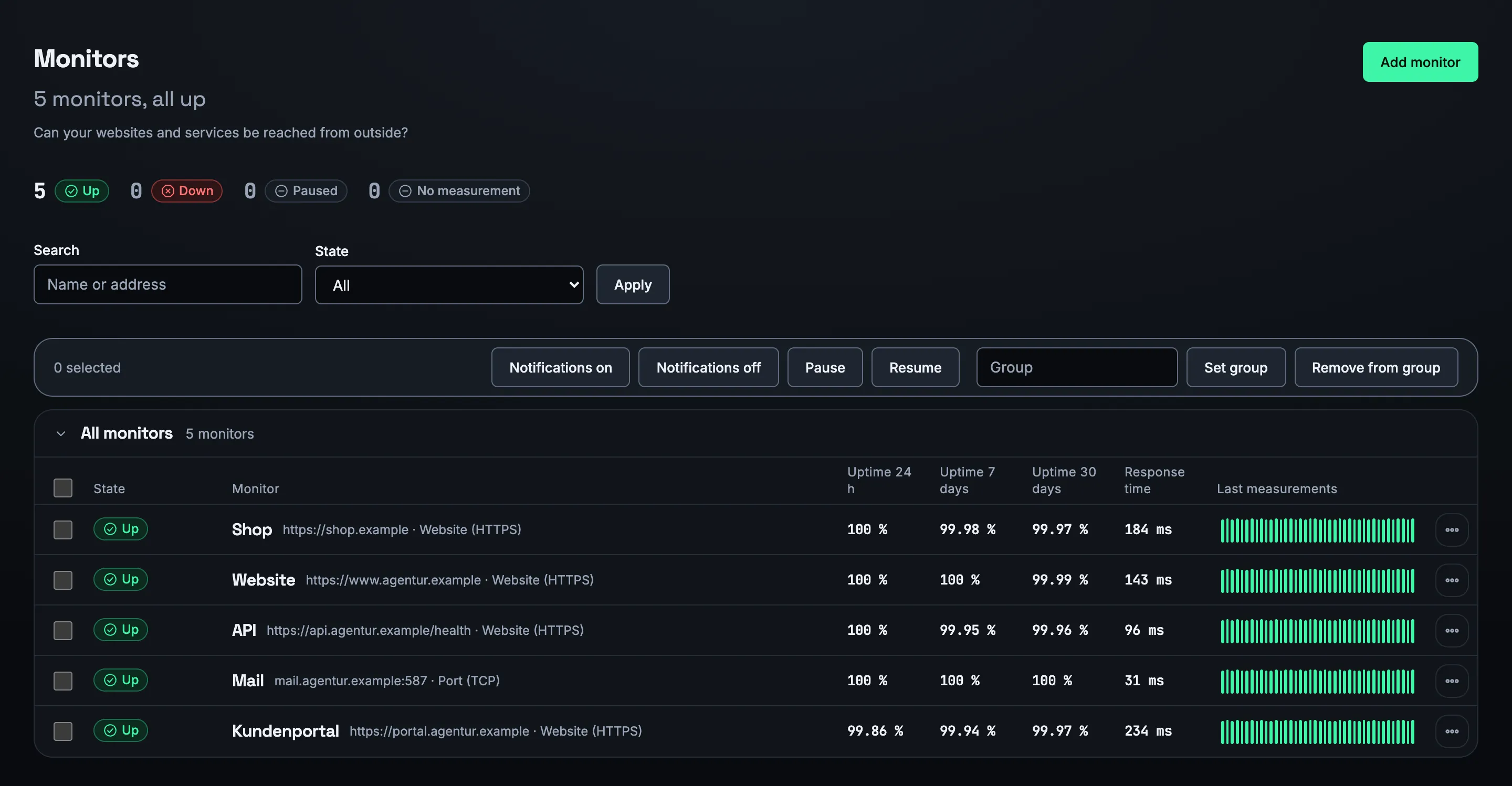
The list of monitors shows availability over 24 hours, seven and 30 days, the response time and the last 40 rounds as a strip. With “Check now” you ask again straight away, for example after a fix.
03
Certificate and domain
Certificates and domains expire quietly. Lynx tells you beforehand.
For every HTTPS monitor Lynx reads the certificate the server actually delivers and warns 14 days before it expires, critically from 3 days. Both values can be changed or switched off. An expiring certificate is an incident of its own and never appears on a public status page.
For domains Lynx looks up the expiry date over RDAP once a day: a warning under 30 days, critical under 7. This works for every ending whose registry publishes the date – not for .de, .at, .ch, .eu, .it, .es, .be and .io; Lynx does not create a domain monitor for those.
Certificate
warning from 14 days, critical from 3 – adjustable
Domain
warning under 30 days, critical under 7 – via RDAP
04
Heartbeats for cron jobs
Some things cannot be asked from outside: the nightly backup, an import, a cron job. Here Lynx turns the question around.
Your cron job calls an address when it has done its work, and Lynx speaks up if the call does not arrive in time. You give the schedule as an interval – from one minute to 30 days – or as a cron expression with a time zone, plus a grace period, one hour by default.
If the job calls /start at the beginning, Lynx also measures how long it runs. With /fail or the exit code at the end it reports a failure itself. Lynx shows the last 50 calls.
# At the start of the job (measures the run time)
$ curl -fsS -m 10 --retry 5 -o /dev/null https://lynx-heartbeat.com/ping/hb_…/start

# When the work is done
$ curl -fsS -m 10 --retry 5 -o /dev/null https://lynx-heartbeat.com/ping/hb_…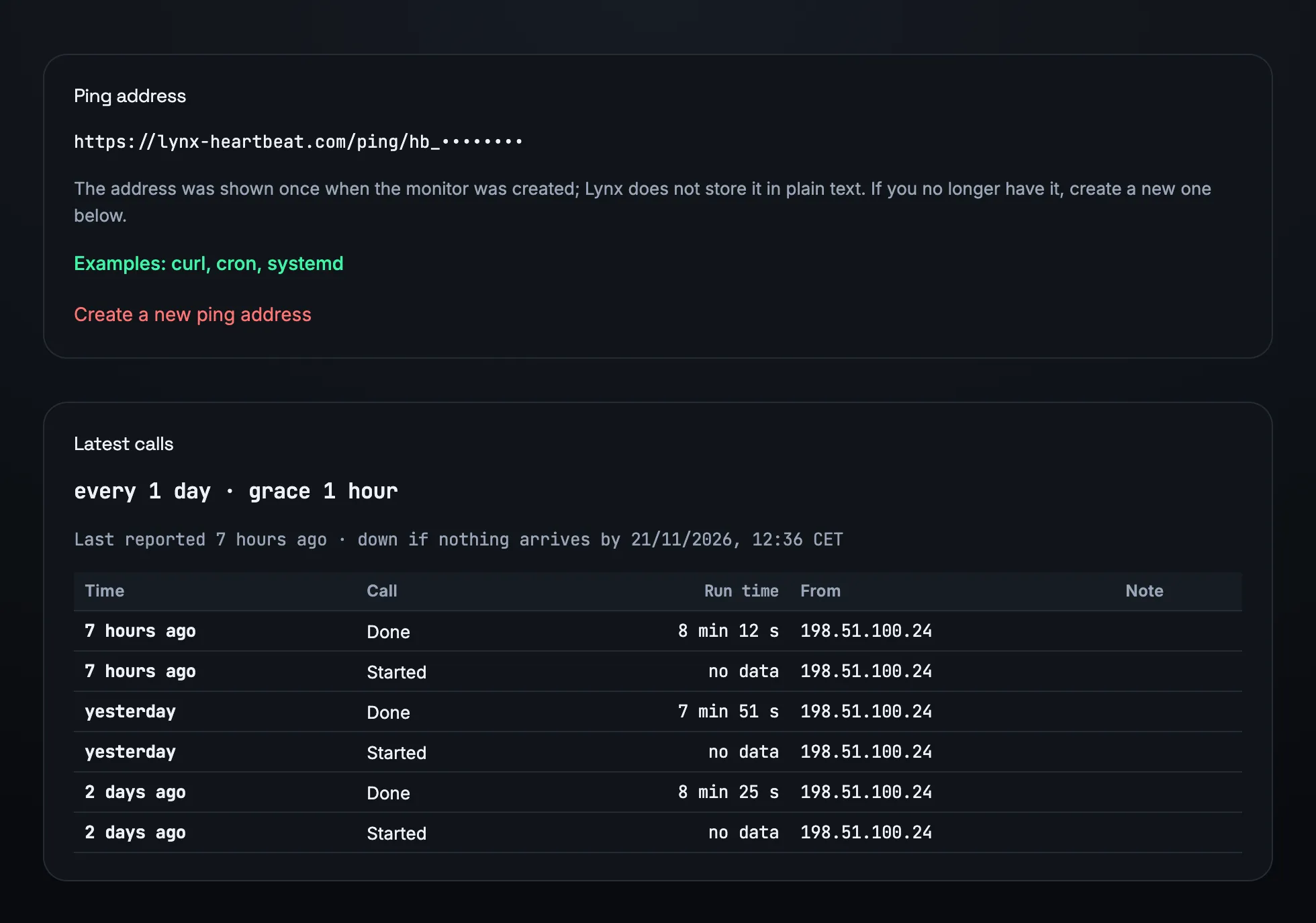
05
Ping, TCP and DNS
Not everything is a website. Lynx also checks mail servers, databases and name resolution from outside.
Lynx does not check addresses in internal networks: a monitor always points at something that is reachable from the internet.
TCP
is the port open and accepting connections?
Ping
does the server answer ICMP?
DNS
does the name resolve – to the expected IP address if you want?
06
One incident per monitor
Every monitor has its own incidents – with a start, a reason and a “resolved” message.
The reason is written out: timeout, DNS, certificate, wrong status code, missing text, too slow, port closed, no ping. If a location cannot measure at all, that is a note and never an outage.
For a single monitor you can set a maintenance window or switch off notifications; monitors can be sorted into groups. Who hears about an incident and when is set in the notifications.
Frequently asked questions
How often does Lynx check my website?
Once a minute by default, from every location. You can choose the interval per monitor between ten seconds and one day; DNS monitors ask every five minutes by default.
Why do I get no alert for a short glitch?
Because a round is only red when all locations currently reporting see the error, and because it takes two red rounds in a row to open an incident. A single failure at one location wakes nobody.
Does Lynx warn before my .de domain expires?
No. The registry for .de does not publish the expiry date over RDAP, and neither do those for .at, .ch, .eu, .it, .es, .be and .io. Lynx does not create a domain monitor for these endings. It still checks the website's certificate.
Can I check pages behind a login?
Yes, with Basic or Bearer authentication and custom headers. Lynx stores the credentials encrypted. A form login with a POST body is not available.
How many monitors can I create?
That depends on the plan: Start includes 10, Team 50 and Agency 200 monitors. During the trial you can use up to 50.
More features
Check your most important page.
Enter the address, set the text, done – the four locations start asking within the next minute.