AI incident analysis with Claude
At 3 a.m., an assessment instead of raw data.
When a server goes red, Claude reads what Lynx measured around the incident and tells you the likely cause, the evidence from your own data and the first steps — with the command and its risk. You decide what to run.
AI incident analysis with Claude
Claude never runs anything
The answer is text. Lynx sends no command to your servers.
Your own Anthropic key
Anthropic bills you directly. Lynx adds nothing on top.
Off until you switch it on
The account owner enables it and confirms what is sent.
Disk full at 03:22. Now what?
An alert at night usually says only what crossed a threshold. Then the search begins: which process is writing, since when, has this happened before, and which command helps without making things worse — half asleep, on a server you may not have touched in months.
Lynx has already measured most of the answers: the metrics of the hours before, the largest processes, the checks that went red with it, earlier incidents on the same server. The AI incident analysis puts this in front of Claude and returns an assessment you can act on.
01
The analysis: cause, evidence, steps
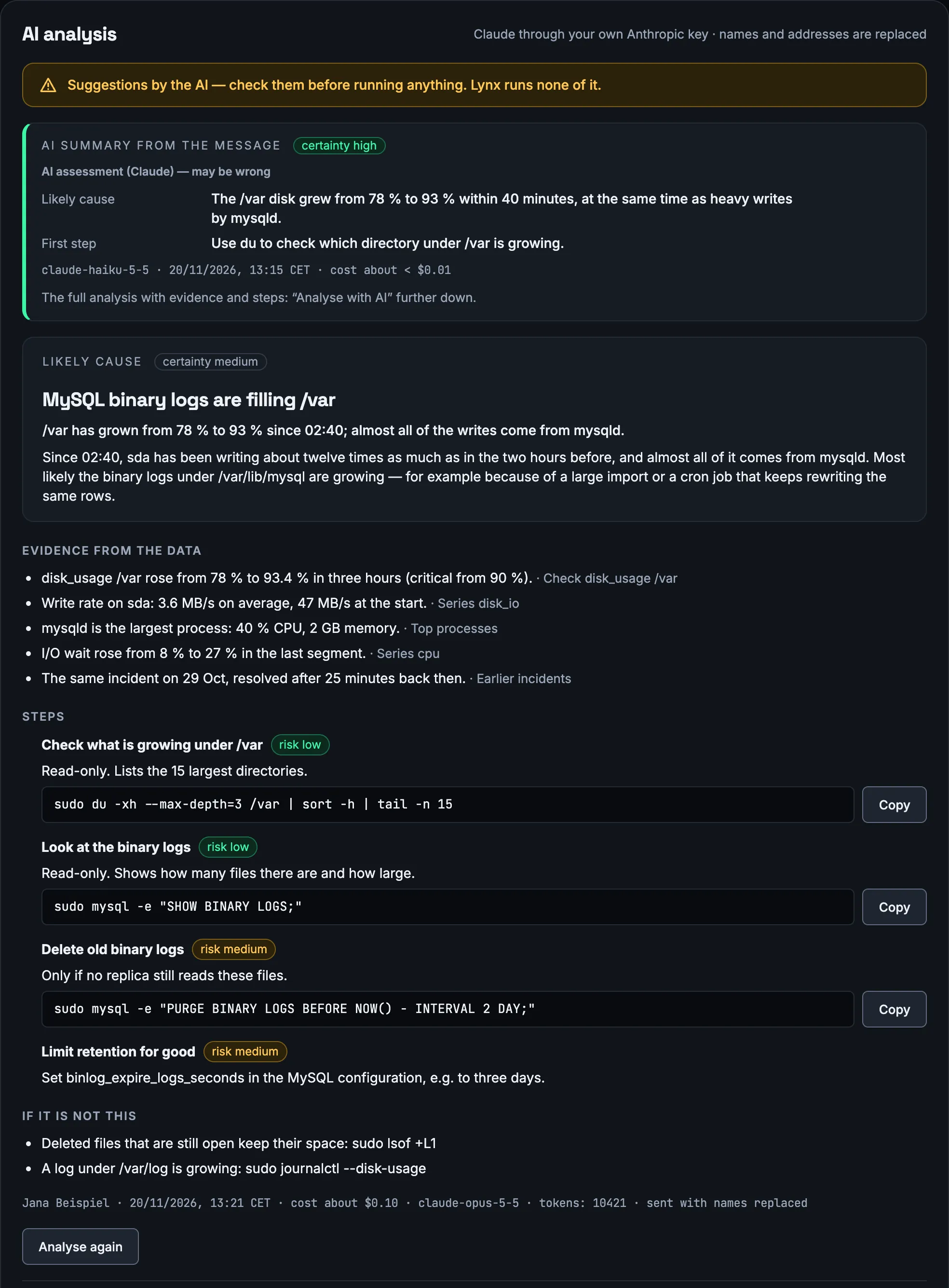
One click on “Analyse with AI” on the incident. The answer appears while Claude is still writing and is structured the same way every time.
Likely cause
in one sentence, with how certain Claude is: low, medium or high
Evidence from your data
the measurements that support it, each with the check or series it comes from
Steps with command and risk
what to do first, the exact command to copy and a risk rating for each step
If it is not that
what to check next if the cause turns out to be different
Above every answer it says: suggestions by the AI — check them before running anything. The analysis is stored with the incident, with person, time and cost, so the next person on call can read it instead of starting over.
02
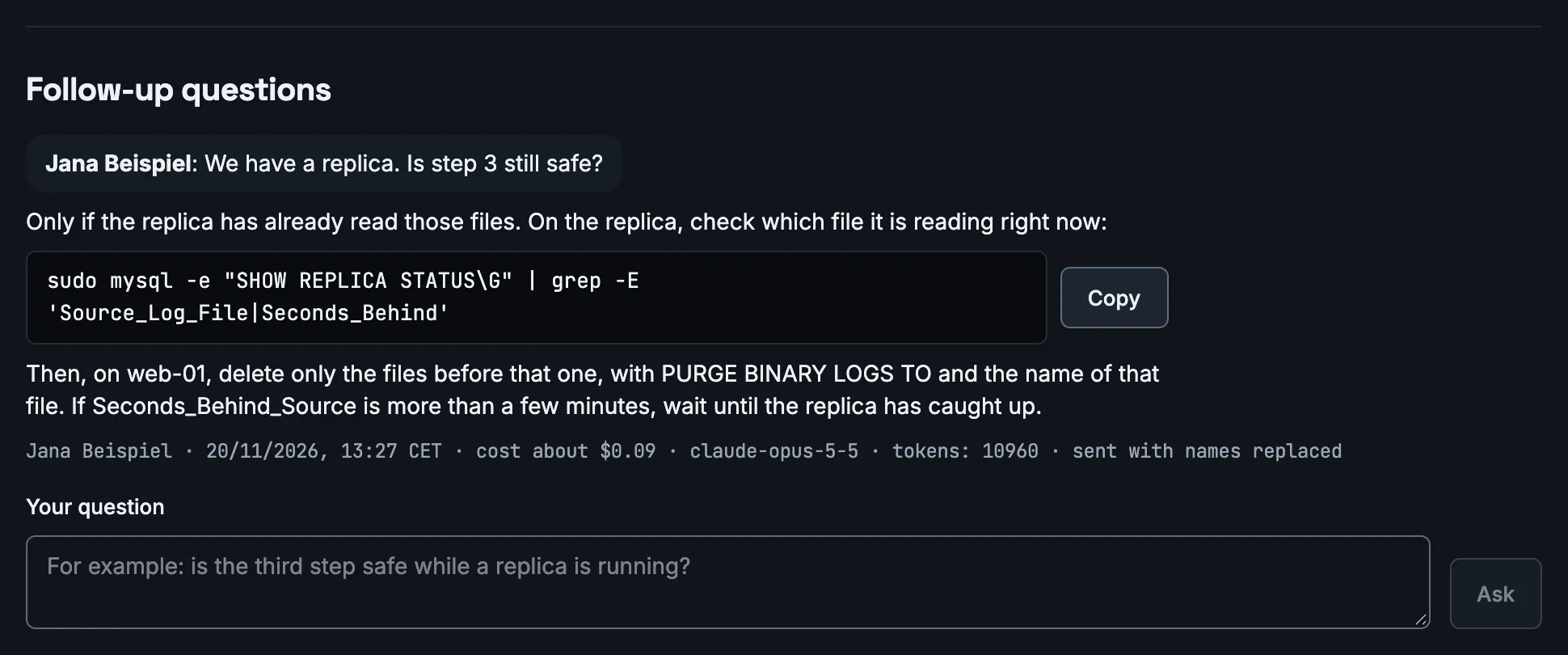
Ask follow-up questions in the same thread
Is step 3 safe if we have a replica? What does this command do exactly? Follow-up questions go into the same thread; Claude knows the analysis and the data behind it. Commands in the answer come as code with a copy button.
Up to 20 follow-up questions per analysis. Every question is a click by a person — Lynx never asks on its own.
03
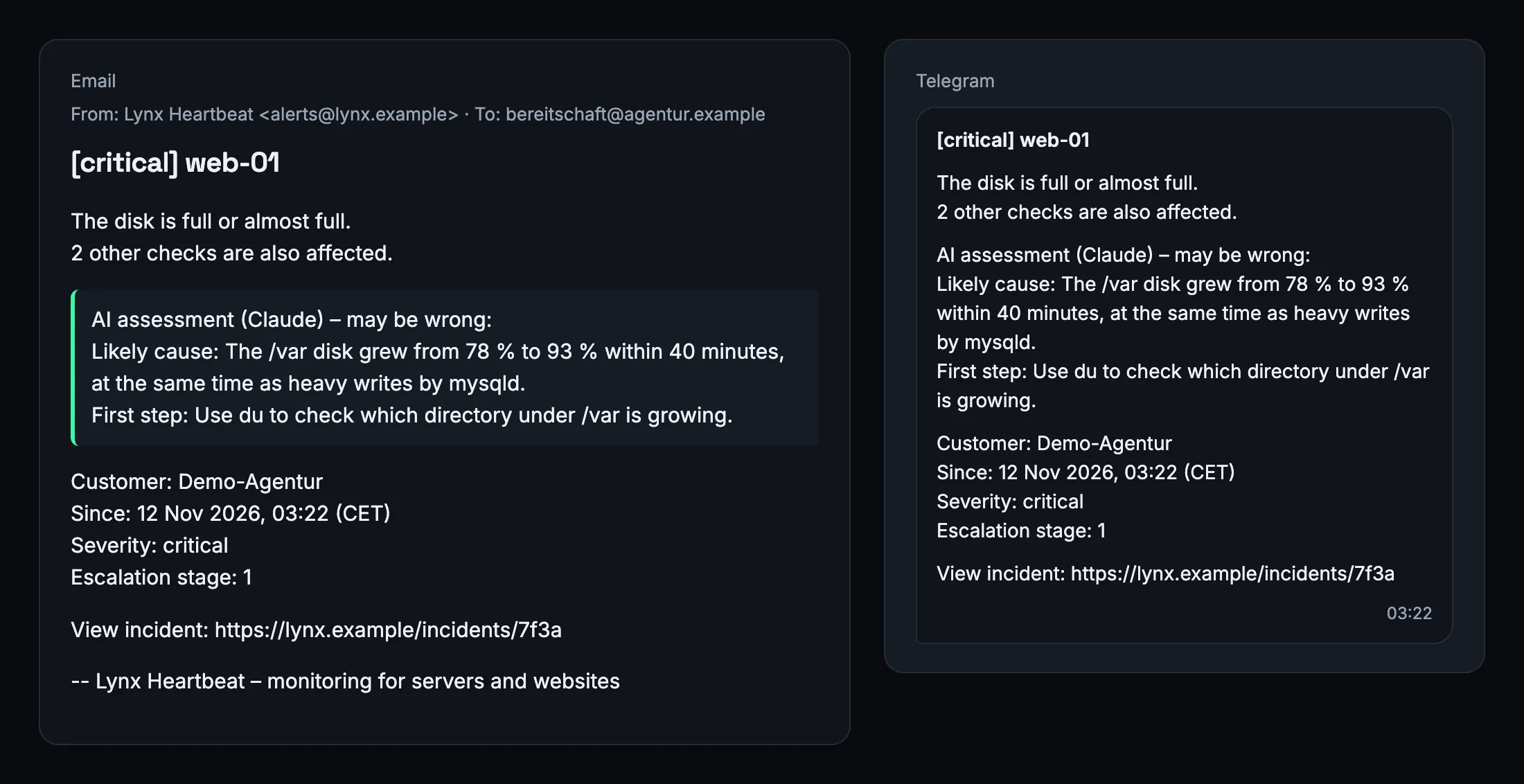
A short assessment right in the alert
If you switch it on, the alert itself carries one sentence on the likely cause and one on the first sensible step, clearly marked “AI assessment (Claude) – may be wrong”. You know where to start before you open the laptop.
It comes with the first alert and with the escalation, not with “resolved”. An assessment with low certainty is never put into an alert. No alert waits longer than 8 seconds for it — if it is not ready, the alert goes out without it.
The short assessment uses the fast model Claude Haiku 5.5, has its own switch (off by default) and is included from the Team plan.
Where it appears
- Email: its own paragraph after what was measured
- Telegram: like the email
- Slack and Microsoft Teams: its own section, as plain text
- Webhook: the field ai_summary
- Push: the cause sentence, if the message stays short enough
- Incident page: at the top of the AI analysis section
04
Claude as a connector: ask your Lynx data
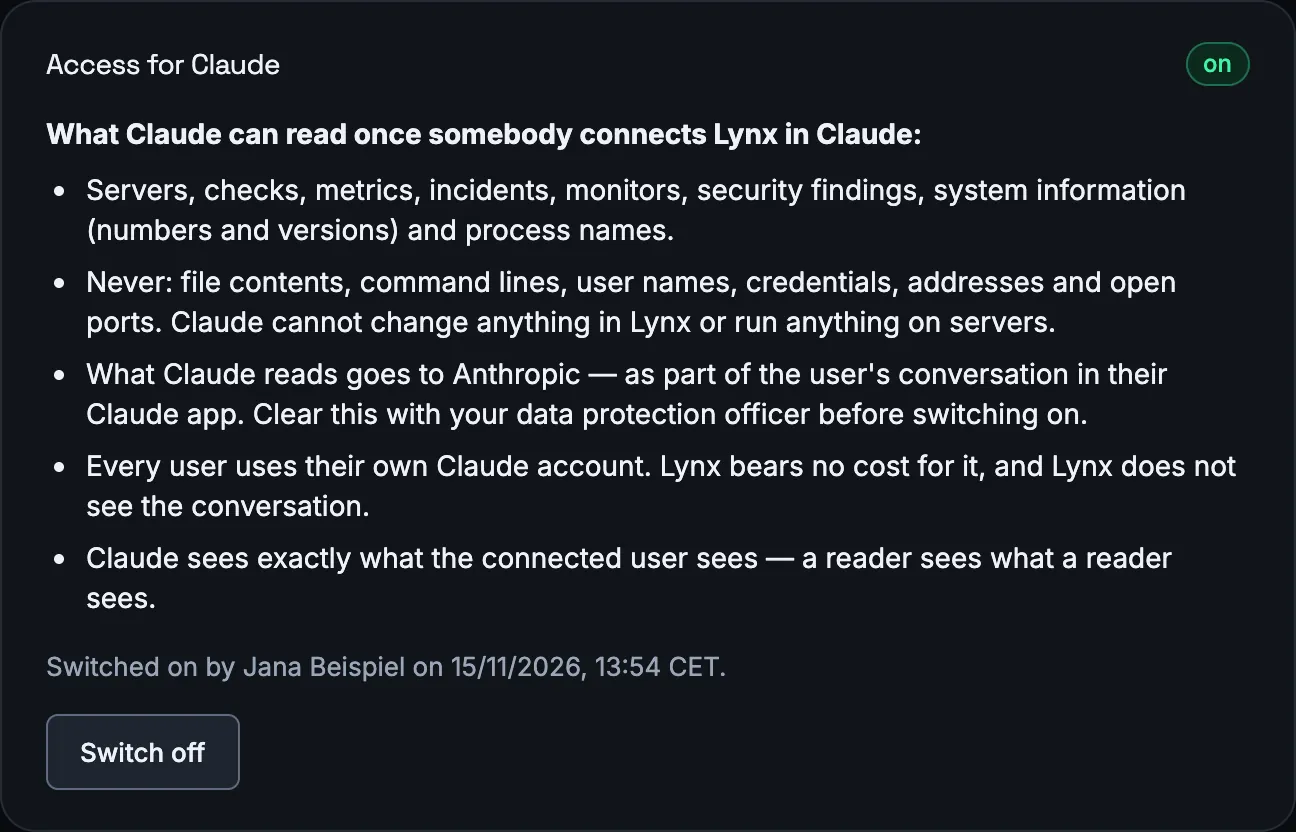
Connect Lynx to your own Claude — in claude.ai, Claude Desktop or Claude Code — and ask in your own words: which servers have a problem, what happened last night, why was the shop slow? Claude reads the answers from Lynx through the Model Context Protocol (MCP).
The access is read-only: no tool changes, acknowledges or switches anything. Every user connects with their own Claude account and sees exactly what their role in Lynx allows. Lynx needs no key for this and does not see the conversation. Connections can be revoked at any time and are disconnected when the password changes.
The account owner switches the access on. Included in the Agency plan.
You stay in control
The AI help is built so that nothing happens without you — and you can see what it costs and what it sees.
Claude never runs anything
There is no tool and no access to a server. The answer is text; running a command is up to you.
Your own Anthropic API key
Each account brings its own key from the Anthropic Console. Lynx stores it encrypted and never shows it again — only its last four characters.
Billed directly by Anthropic
The costs go to your Anthropic account. The AI help is not part of any Lynx price, and Lynx adds no mark-up.
Off by default
Only the account owner can switch it on, after confirming what is sent. If that notice changes, it has to be confirmed again.
Replace names and addresses
On request, server names, host names, IP addresses and domains are replaced by placeholders before sending and put back into the answer.
Who may use it
Owners and technicians can analyse and ask. Readers and end customers do not see the AI help.
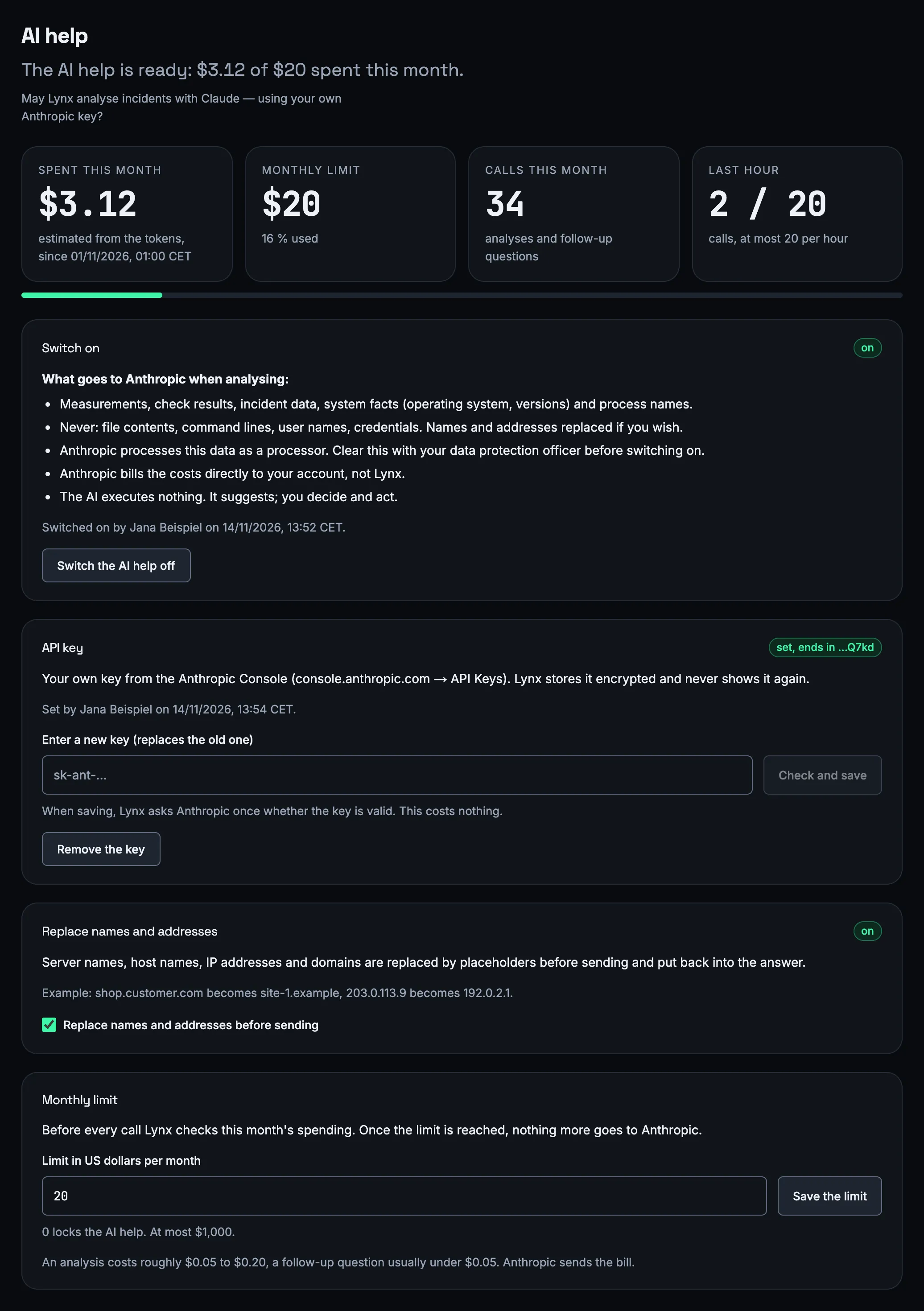
What is sent to Anthropic — and what never is
Lynx builds the context itself, from what it has measured about this incident. Nothing is read from your server for the AI.
Sent
- The incident: cause, severity, state and times, with the checks it affected
- The checks: kind, target, thresholds and their history in 15-minute steps
- The metrics from two hours before to 15 minutes after the start, condensed to minimum, mean, maximum and trend
- System information: operating system and versions — numbers and versions only
- The names of the largest processes at the time, with CPU and memory
- Earlier incidents on this server in the last 90 days
Never sent
- File contents
- Command lines
- User names and credentials, including the login details of a monitor
- IP addresses and open ports from the system information
Anthropic processes this data as a processor for you; clear this with your data protection officer before switching on. For every analysis, Lynx stores what was sent (with placeholders, if names are replaced), the answer, the model, the tokens and the cost.
What it costs
You pay Anthropic for what you use, in US dollars. Lynx shows an estimate next to every answer and keeps a monthly limit for you.
about $0.08–0.11
for a typical analysis, measured on real calls with Claude Opus 5.5; a very large incident up to about $0.21
about $0.09
for a follow-up question
about 0.1 cent
estimated for the short assessment in an alert, per incident
$20 a month
the default monthly limit — enough for about 200 analyses. You choose the limit; 0 stops all calls.
Before every call Lynx checks this month's spending, including calls still running. Once the limit is reached, nothing more goes to Anthropic and the page says so. At most 20 analyses and questions per hour and account. The figures are estimates from the token counts; the bill comes from Anthropic.
Questions about the AI help
Does Claude run commands on my servers?
No. Claude has no tool and no access to your servers, and Lynx sends no command anywhere. The analysis is text with suggestions; whether and what you run is your decision.
Which Claude model does Lynx use?
Claude Opus 5.5 for the analysis and the follow-up questions, Claude Haiku 5.5 for the short assessment in alerts. Both through your own Anthropic API key.
Can I use my Claude Pro or Max subscription?
Not for the analysis: it needs an API key from the Anthropic Console, because Anthropic does not allow third-party services to sign in with a subscription. For the Claude connector (MCP) you use your own Claude account in Anthropic's own apps.
What does it cost, and who bills it?
A typical analysis costs about $0.08–0.11, a follow-up question about $0.09, the short assessment in an alert about 0.1 cent per incident. Anthropic bills your account directly; Lynx adds nothing. The monthly limit (default $20) stops all calls once it is reached.
How reliable is replacing names and addresses?
Server names, host names, IP addresses, domains and email addresses are replaced, including the hosts of your monitors with any ending. What it cannot recognise is a name that looks like neither a name Lynx knows nor an address — for example a customer name in a mount point such as /srv/customer-name.
Who in my team can use the AI help?
Owners and technicians can start an analysis, ask follow-up questions and read stored analyses. Only an owner can change the settings. Readers and end customers do not see the AI help.
What happens if Anthropic is unreachable or the limit is reached?
The incident page says so in a sentence instead of starting a call, and alerts go out without the short assessment, at most 8 seconds later than usual. A call that Anthropic did not accept costs nothing.
Which plans include it?
The analysis on the incident is available in every plan. The short assessment in alerts is included from the Team plan, the Claude connector in the Agency plan. During the free trial, everything is available.
Try the AI incident analysis on your own servers.
Install the agent, add your Anthropic key and analyse the next incident with one click.