Alerts and escalation
Alerts that wake you when it matters – and not otherwise.
Lynx groups red checks into one incident, notifies over six channels, respects quiet hours and maintenance windows and escalates when nobody responds. When the problem is over, Lynx says so too – with how long it lasted.
The essentials
One incident instead of twenty messages
A check has to fail twice in a row, and every address gets one message per incident.
Held back, not thrown away
Quiet hours and maintenance windows hold notifications back – measuring always continues.
Nobody is forgotten
If nobody acknowledges an incident, Lynx notifies the next stage after 15 and after 30 minutes.
01
Six channels
Notifications go where your team already works – by email, Telegram, push, Slack, Microsoft Teams or webhook.
Push arrives as web push in the browser or in Lynx on your smartphone's home screen, on the iPhone from iOS 16.4. Push is off per account until an owner or technician switches it on, and the browser only asks for permission when you tap the button.
A webhook can carry a signature (HMAC-SHA256 over the timestamp and body) and an ID per delivery so your receiver can spot repeats; the target must be publicly reachable over HTTPS. You can try every channel with a test message. If a receiver does not answer, Lynx tries again after 30 seconds, 2, 5, 15 and 30 minutes.
Email, Telegram and push are included in every plan; Slack, Microsoft Teams and webhook from the Team plan.
Email
to any address you enter
Telegram
as a message to a chat
Push
in the browser and on the smartphone
Slack
a message with a link to the incident
Microsoft Teams
as a card through a workflow
Webhook
signed, for your own systems
02
Who hears what – and when
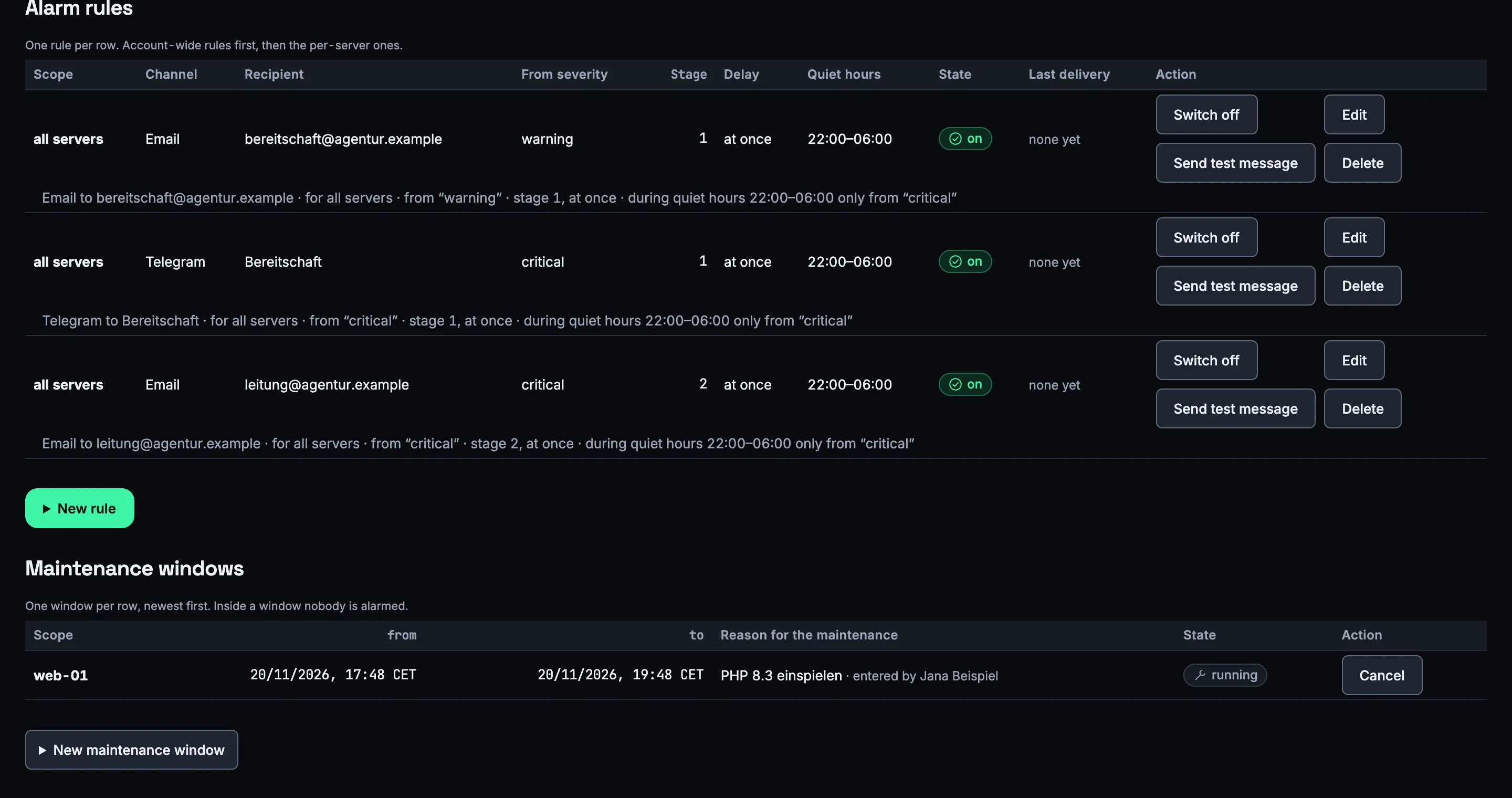
A rule decides which channel goes to which recipient: for one server or all of them, from which severity, at which escalation stage and with which quiet hours.
Quiet hours follow your account's time zone, including across daylight saving changes. A new rule suggests 22:00 to 06:00 and still lets critical incidents through; a rule without any quiet hours has to be confirmed explicitly.
What falls into quiet hours is held back, not thrown away: if the incident is still open when they end, the notification goes out. If it has resolved itself in the meantime, Lynx wakes nobody.
Owners and technicians change the rules, readers can only view them. Every change goes into the change log, with a reason if you like, and every rule shows its last delivery.
03
Maintenance windows
Planning an update? Create a maintenance window – for the whole account, one server with its monitors or a single monitor, for up to 28 days.
During the window Lynx keeps measuring but holds notifications back. If an incident is still open when the window ends, the notification goes out; if it is over, it stays quiet. Unlike quiet hours, a maintenance window also holds back critical incidents.
A public status page shows “maintenance” for that time – your customers see that work is going on, not that something is down.
04
Escalation in three stages
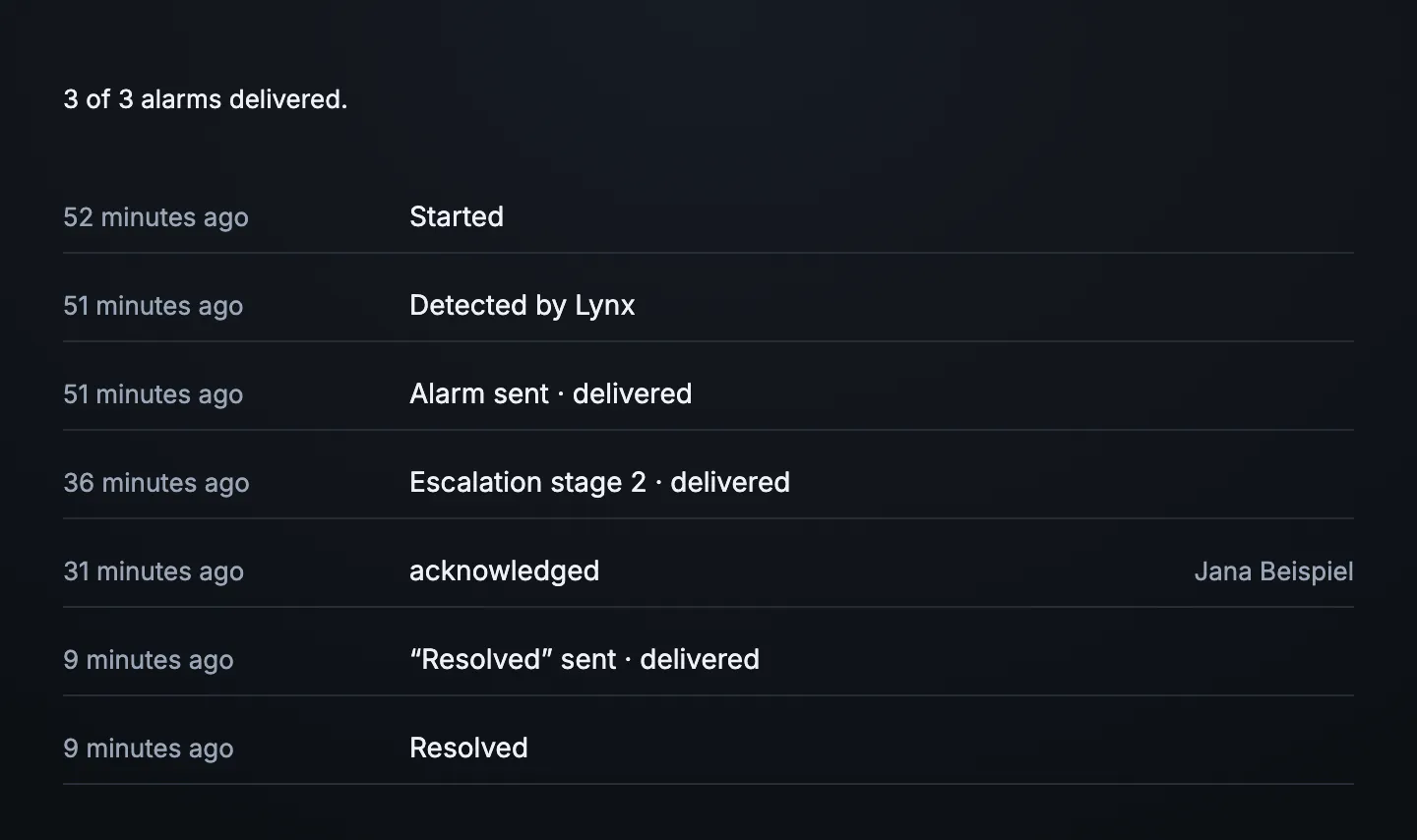
Stage 1 is notified immediately, stage 2 after 15 minutes and stage 3 after 30 minutes – counted from the moment Lynx detected the problem.
Every rule belongs to a stage. Acknowledging an incident stops the escalation; anyone who already got a message about this incident does not get the same one again. The history on the incident shows who was notified when and over which channel.
When the problem is over, everyone who was notified gets the “resolved” message – with how long it lasted. Whoever closes an incident by hand writes down what was done; that also goes to everyone who received the alert.
05
Less noise
So that a single red measurement does not become an alert, Lynx waits for confirmation.
A check has to fail twice in a row before an incident is opened; if it gets worse from warning to critical, that happens without delay. It is back to normal after two checks without errors. An outside monitor only counts as down when every location currently reporting sees the error.
If a check switches between failing and fine more than three times in an hour, it counts as unstable: Lynx sends one notification about it instead of a dozen and pauses the escalation.
Lynx also tells you when it can no longer see anything: if a check stops delivering values, that is reported, and an agent that sends no data for ten minutes is an incident of its own.
06
Counting false alarms
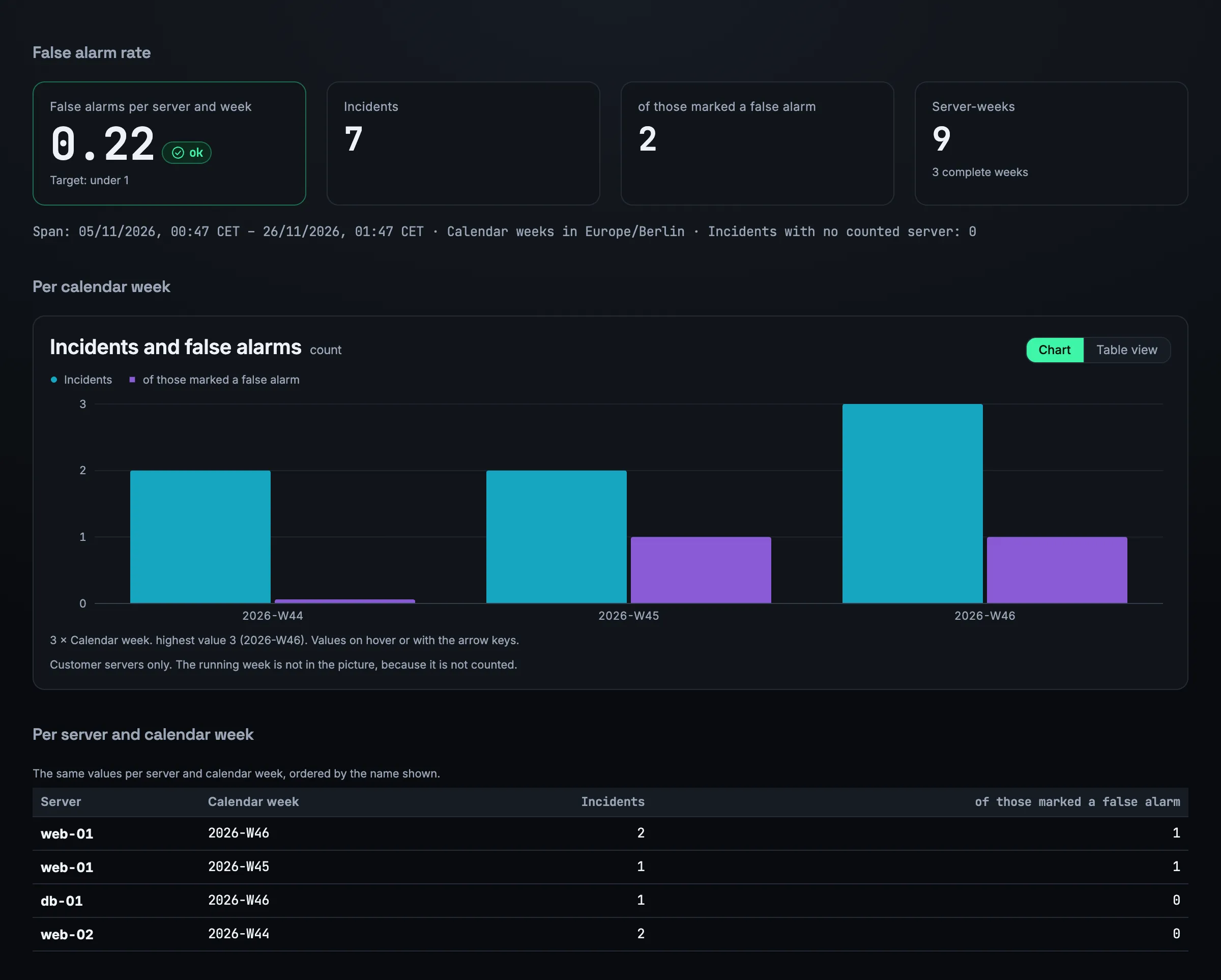
An alert that was not real is marked – with a reason. Lynx counts false alarms per server and calendar week and measures them against a target: fewer than one per server per week.
The mark is an action of its own on the incident and cannot be undone. The current week is shown but only counts once it is over; without a complete week it says “No data”, not zero.
Owners, technicians and readers can see the report. It shows which server raises false alarms too often – and where a threshold should be adjusted.
07
The weekly report
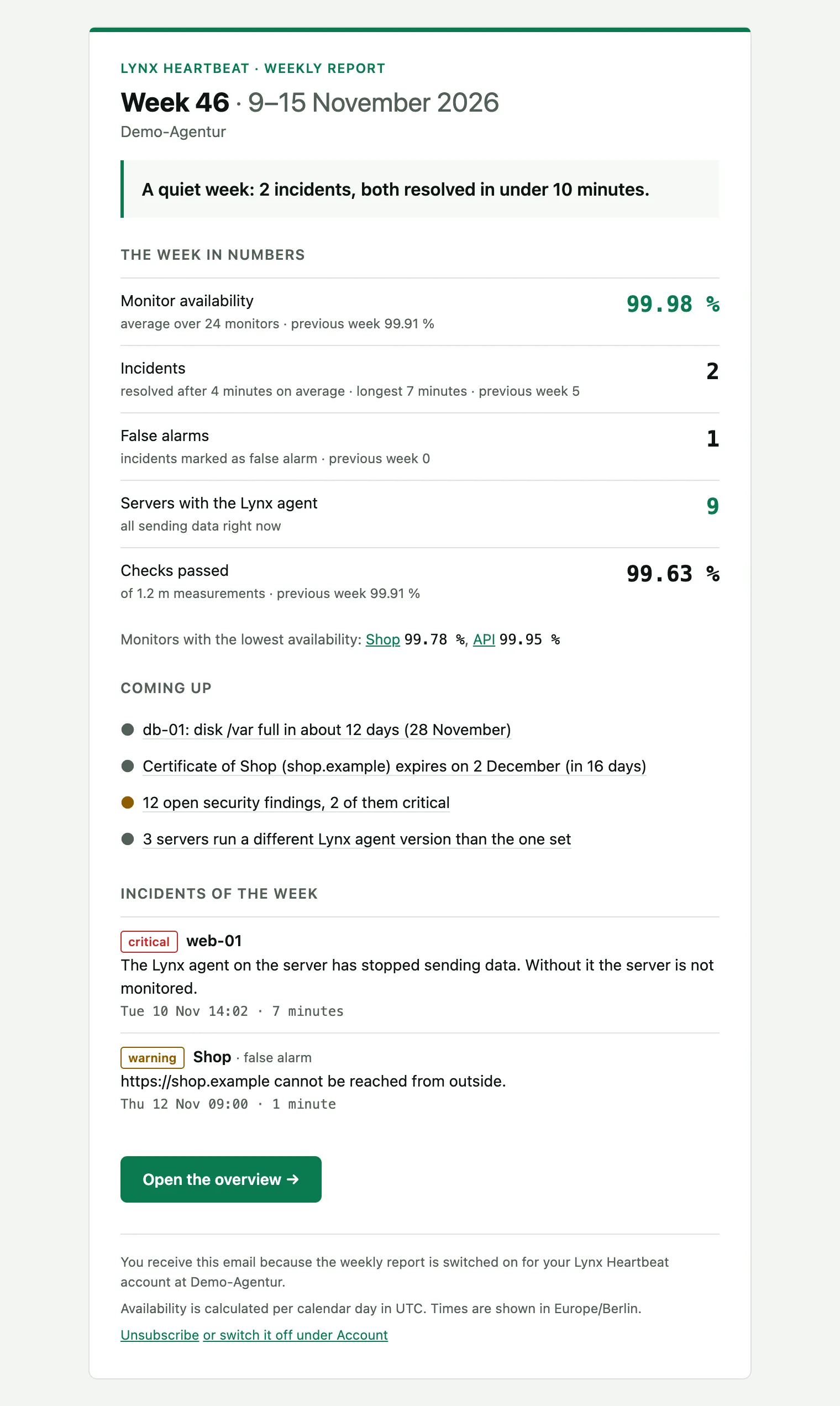
Every Monday at 07:00 in your account's time zone: the past week in one email.
At the top is what needs attention now – open incidents. Then the availability of your monitors, the number and duration of incidents, false alarms and the share of checks without errors, each compared with the week before. At the end is what is coming up in the next 30 days: full disks, expiring certificates and domains, open security findings.
The report is on for the owner; every other user can switch it on in their account. Every email can be unsubscribed with one click. The app has a preview and “Send to me now”.
Frequently asked questions
Are there text messages or phone calls?
No. Lynx notifies by email, Telegram, push, Slack, Microsoft Teams and webhook. A webhook lets you connect your own system that passes messages on.
Will I be woken at night for every warning?
Only if you want to be. Quiet hours hold notifications back and by default only let critical incidents through. Anything held back that has resolved itself by the end of the quiet hours wakes nobody.
What happens during a maintenance window?
Lynx keeps measuring but holds back every notification for the affected area, including critical incidents. If an incident is still open when the window ends, the notification goes out. A public status page shows “maintenance”.
Which channels are included in which plan?
Email, Telegram and push in every plan; Slack, Microsoft Teams and webhook from the Team plan. During the trial all channels are included.
How can my system check that a webhook comes from Lynx?
With the signature: if the webhook has a secret key, Lynx uses it to compute an HMAC-SHA256 over the timestamp and body. Your receiver recomputes it and rejects requests older than five minutes. Every delivery carries an ID so a repeat is not counted twice.
More features
Decide who gets woken.
One rule per channel, quiet hours for the night and a second stage in case nobody responds.